Welcome Bedrock players on a Java server with Geyser
17 September 2026 · updated on 07 October 2026 · 2 min read
A large share of Minecraft players play Bedrock Edition: phone, tablet, console, Windows. Without Geyser, they can't join a Java server. With it, everyone shares the same world.
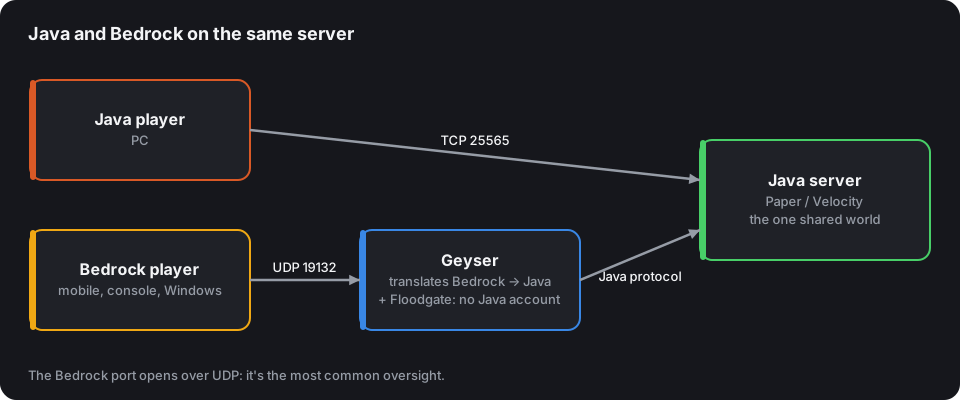
How it works
Geyser listens for Bedrock players (over UDP, port 19132 by default) and translates their protocol into the Java protocol. Your server only sees Java players. Floodgate lets Bedrock players in without owning a Java account: essential in practice.
Setup
The Geyser configurator gives the steps, the config.yml and the firewall commands suited to your case. In the most common case, a standalone Paper server:
- Drop
Geyser-Spigot.jarandFloodgate-Spigot.jarintoplugins/. - Start once, then set
auth-type: floodgateinplugins/Geyser-Spigot/config.yml. - Open port 19132 over UDP.
Behind a Velocity proxy, install Geyser and Floodgate on the proxy, Floodgate on each server, and copy the proxy's key.pem to each of them.
Your host only opens one port? Set
clone-remote-port: true: Bedrock uses the same number as Java, over UDP.
Bedrock usernames
Floodgate prefixes Bedrock usernames with a dot (.Steve) so they aren't confused with a Java account of the same name. Check that your plugins accept it (most do) and keep it in mind for moderation commands and the whitelist (/fwhitelist).
Limits to know
- Some Java mechanics don't exist on Bedrock: a few animations, plugin interfaces that use unusual inventories. Floodgate can show native Bedrock forms instead of chest menus.
- Java resource packs aren't displayed: Geyser accepts separate Bedrock packs.
- Consoles (Xbox, PlayStation, Switch) have no button to add a custom server: players go through a DNS trick or a companion app. That's a console limit, not your server's.
- For a server reserved for Bedrock players, the official dedicated server is another option: see Create a Minecraft Bedrock server.
Tell players about it
Tick Bedrock on your CubeVote listing: your server shows up in the Bedrock filters, and the "Join" section of your listing explains to mobile players how to get in.