Find the cause of lag with Spark
19 September 2026 · 2 min read

"The server is lagging" can mean ten different things. Spark measures what really happens in each tick. Two minutes of profiling save hours of disabling plugins at random.
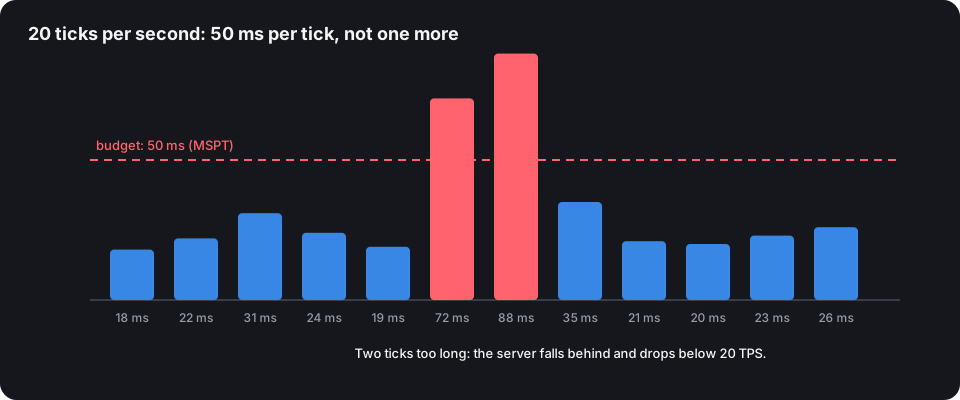
TPS and MSPT, the two numbers to know
- The server runs the world 20 times per second: that's the TPS (ticks per second).
- Each tick therefore has 50 ms. The time actually taken is the MSPT (milliseconds per tick).
- As long as MSPT stays under 50, the server holds 20 TPS. Above that, it falls behind: everything slows down.
MSPT tells you more than TPS: at 45 ms, the server is at 20 TPS but on the edge of the cliff.
Install and measure
Spark is built into recent Paper (/spark command); otherwise, install it as a plugin or mod.
/spark tps
/spark health
/spark tps gives TPS and MSPT over 10 seconds, 1 minute and 15 minutes. /spark health adds memory, CPU and disk space.
The profiler
When the lag happens:
/spark profiler start
(wait 2 to 5 minutes of normal play)
/spark profiler stop
Spark gives a link to a web report. Expand the tree from Server thread: each line shows the share of tick time it uses.
Reading the report
| What you see at the top | Likely cause | Lead |
|---|---|---|
ChunkGenerator, NoiseChunkGenerator |
terrain generation | pre-generate with Chunky |
EntityTick, Villager, brain |
too many entities, villagers | limit farms, lobotomisation (Purpur) |
HopperBlockEntity |
masses of hoppers | Paper's hopper settings |
| a plugin's name | a greedy plugin | update it, report it to its author, replace it |
GC in /spark health |
garbage collector | Aikar's flags, suitable memory |
What next?
Fix one thing at a time, then profile again at the same hours: it's the only way to know what worked. The anti-lag configuration gives Paper, Spigot and Purpur settings tuned to your type of server, each with what it changes for players.