Pre-generate your world with Chunky to stop exploration lag
18 September 2026 · updated on 07 October 2026 · 1 min read

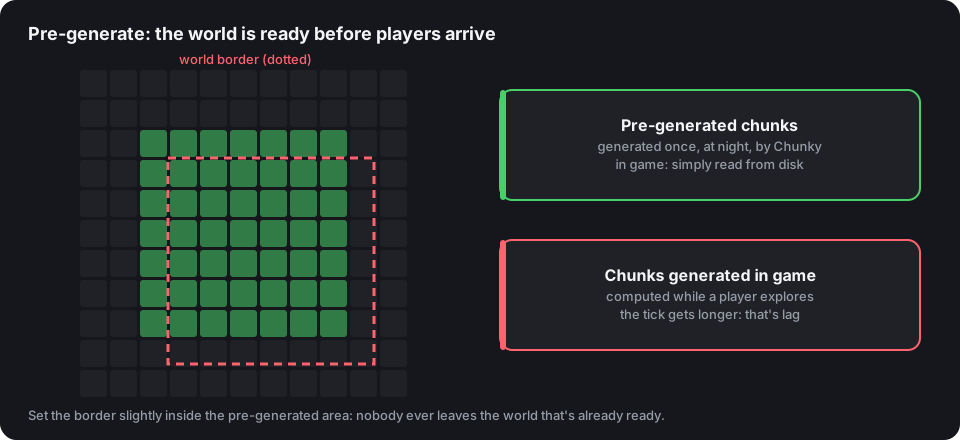
Three players head off exploring with elytra, and the whole server crawls. Nothing unusual: every unknown chunk has to be generated (terrain, caves, structures, light) during the tick. Pre-generating means doing that work once, in advance, when nobody is playing.
Install Chunky
Chunky exists for Paper, Fabric, Forge and NeoForge. Drop it into plugins/ or mods/ and restart.
Start the pre-generation
/chunky world world
/chunky center 0 0
/chunky radius 5000
/chunky start
A radius of 5,000 blocks makes a 10,000 × 10,000 square, about 390,000 chunks. Allow several hours depending on the CPU: run it at night, or with the server closed. /chunky pause and /chunky continue stop and resume without losing anything.
Do the same for the Nether (world_nether, a radius eight times smaller is enough) and the End if you keep it open.
Set the border
Without a border, players end up leaving the prepared area. With the ChunkyBorder plugin or the game command:
/worldborder center 0 0
/worldborder set 9800
Keep the border slightly inside the generated area (here 9,800 for 10,000): chunks at the edge are loaded when a player gets close.
How much disk space?
Roughly allow 2 to 4 GB per 100 million square blocks of surface, more with recent versions (deep caves) and generation mods. Check free space before starting a large radius.
Which radius?
| Active players | Suggested radius |
|---|---|
| under 30 | 3,000 to 5,000 |
| 30 to 100 | 5,000 to 8,000 |
| over 100 | 8,000 and more, or a border that grows each season |
Widening the border each season, after a new pre-generation, makes people want to explore again, and makes a good opening event.
Pre-generation is one of the settings the anti-lag configuration reminds you of: it often weighs more than all the others put together.