Open your router's ports for a Minecraft server
12 September 2026 · updated on 07 October 2026 · 3 min read
You play on your server by typing localhost, everything works… and your friends stay stuck on "Can't connect to server". The server isn't to blame: it's your router refusing to let the connection in. You have to tell it which machine to send it to.
What happens, in one sentence
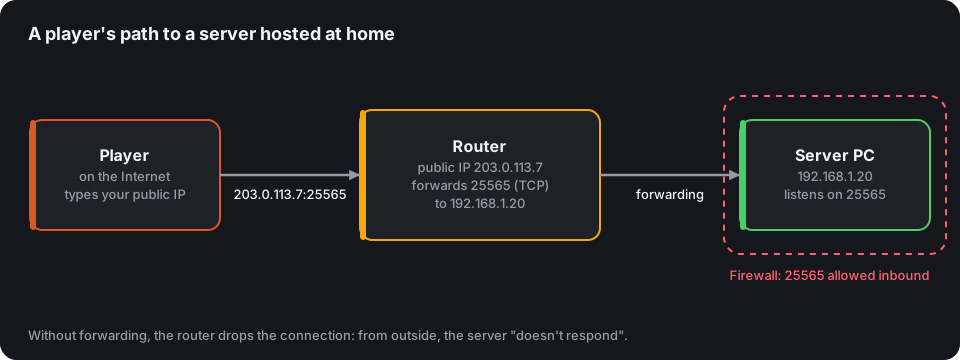
From outside, your whole household has a single address: the router's public IP. When a player connects to it on port 25565, the router doesn't know which device in the house is concerned, and drops the connection. Port forwarding (NAT) is the rule that says: "what arrives on 25565 over TCP, send it to 192.168.1.20".
Step 1: Give the server PC a fixed address
The router hands out local addresses at random across restarts. If the PC goes from 192.168.1.20 to .21, your forwarding points into the void.
- In the router's interface, look for "Static DHCP leases", "Address reservation" or "Fixed IP".
- Associate the server PC's MAC address with an address, for example
192.168.1.20.
Step 2: Create the forwarding rule
Every router names it differently. In its admin page (often 192.168.1.1 or 192.168.0.1), look for one of these menus:
| Menu name | Where it's often found |
|---|---|
| Port Forwarding | Advanced settings, NAT, Firewall |
| Virtual Server | Advanced, NAT forwarding |
| Applications & Gaming | Linksys-style routers |
| NAT/PAT | Network |
Each time, fill in:
- External port: 25565
- Internal port: 25565
- Protocol: TCP (add UDP 19132 if you also open to Bedrock players)
- Destination: the fixed address from step 1
Step 3: Allow the port on the PC
The Windows firewall also blocks incoming connections. When Java first starts, accept the window asking for access to "private and public networks". If you refused it, in a command prompt as administrator:
netsh advfirewall firewall add rule name="Minecraft" dir=in action=allow protocol=TCP localport=25565
On Linux with ufw: sudo ufw allow 25565/tcp.
Step 4: Check from outside
Testing from home proves nothing: your own connection goes through the inside. Use the server tester with your public IP: it connects from the Internet, like a player, and tells you precisely what's blocking: connection refused (nothing is listening: server stopped, wrong port) or no response (forwarding or firewall missing).
Can't open ports? Go through Playit.gg
Router behind CGNAT, 4G or 5G connection, student housing, a router you can't access: sometimes no forwarding is possible. Playit.gg gets around the problem with a tunnel: a small program installed on your PC opens an outgoing connection to Playit's servers, which send back to you the players arriving on a public address they assign you.
- Download the Playit agent for Windows, macOS or Linux and run it on the server PC.
- Follow the link it shows to link the agent to your Playit.gg account (free).
- Create a Minecraft Java tunnel pointing to
127.0.0.1:25565. For Bedrock players, add a Minecraft Bedrock (UDP) tunnel to Geyser's port. - Give your players the tunnel address shown in the Playit dashboard: that's what goes in "Add Server", not your IP.
No port to open on the router, and your personal IP stays hidden. In return:
- latency goes up a little, since players go through a relay;
- all players seem to come from the tunnel's address: IP bans and anti-VPN no longer work, unless you enable the Proxy Protocol offered by Playit and declare it on the server side;
- the agent must keep running alongside the server.
You can list this server on CubeVote with the tunnel address: status, votes and the server tester work the same way.
Common traps
CGNAT: some fibre and 4G offers share one public IP between several customers. No forwarding can work then. Ask your ISP for a dedicated public IP (some give one on request), use a Playit.gg tunnel as above, or go through a host.
- Your public IP changes: use a domain name with dynamic updates (DynDNS), then an SRV record so no port is shown.
- The server listens on the wrong address: leave
server-ip=empty inserver.properties. - Double NAT: a router behind the ISP's box? Each one needs a forwarding rule.
Hosting at home is still perfect for playing with friends. As soon as you aim for a community, a host spares you these questions, see how to choose one.