Set up your Minecraft server's Discord
23 September 2026 · updated on 07 October 2026 · 2 min read
A Minecraft server lives in game a few hours a day, and on Discord the rest of the time. It's where you announce maintenance, settle a dispute, prepare the next season. A badly kept Discord drives people away; a well-organised one keeps players who, without it, would have left at the first outage.
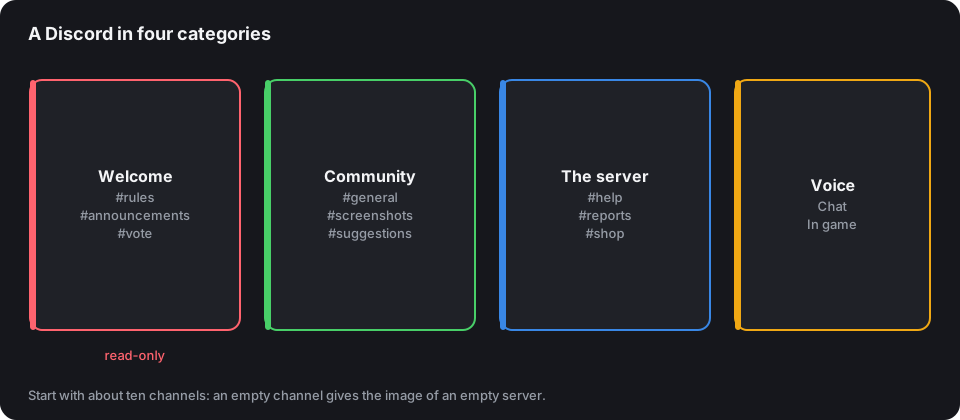
Few channels, well named
The most common mistake: forty channels on day one, thirty-five of them empty. A newcomer sees a dead server. Start small, and add a channel when a topic takes over the general channel.
- Welcome:
rules,announcements,vote(the link, and the announcement of each vote received). - Community:
general,screenshots,suggestions. - The server:
help,reports,shopif you have one. - Voice: two channels are enough at first.
The announcement and rules channels are read-only: one player message in the middle of the announcements, and nobody reads them any more.
Roles that mean something
A role does two things: grant rights, and show who's who. Reuse the in-game ranks: Player, VIP, Helper, Moderator, Admin: with the same colours as the in-game prefixes: a player recognises a moderator at first glance, on Discord as on the server. The Rank tag generator gives your ranks' exact colours.
Only give Administrator to yourself. Moderators need to kick, mute and delete messages, nothing more.
Moderation that holds without you
Discord already provides the essentials in the server settings:
- Verification level "Medium" at least: an account must have existed for five minutes to write, which stops most raids by throwaway accounts.
- AutoMod: word filters, blocking invite links to other servers, a limit on mentions per message. Five minutes of setup, hours of clean-up avoided.
- Onboarding: a few questions on arrival ("Java or Bedrock?", "Which mode interests you?") that assign roles and only show the useful channels.
And write short rules, pinned, shared by the game and the Discord.
Link Discord and the game
- The CubeVote bot announces every vote received in the channel of your choice, and answers
/vote,/statutand/classement. Invite it from your dashboard, then type/lierwith the code shown: it's the simplest way to keep the voting habit alive. Everything is explained in the Discord bot manual. - DiscordSRV links the game chat to a channel, announces logins and can link Discord accounts to Minecraft accounts to sync ranks.
- Webhooks: any plugin able to send a web request can post in a channel, anti-cheat alerts, finished backups.
Keep the channel linked to the game chat separate from the general channel: the two conversations don't move at the same pace.
Keep the Discord alive
- Announce everything: maintenance, events, new features. An announcement channel empty for three weeks says "abandoned server".
- Give a reason to come back: polls on the next update, build contests with screenshots, a monthly recap with the top voters.
- Answer quickly in
help: a stuck player who waits a day doesn't come back.
The invite link
Create a permanent link, with no usage limit, and put it everywhere: MOTD, in-game welcome message, and your CubeVote listing, which shows it prominently. An expired invite link on a listing means players lost without anyone noticing.