Run a Minecraft server with Docker
23 September 2026 · 2 min read

On a VPS or a dedicated server, Docker puts your Minecraft server in a container: Java, Paper and their versions are in the image, your world and plugins in a volume. Updating, moving or restoring becomes a matter of minutes.
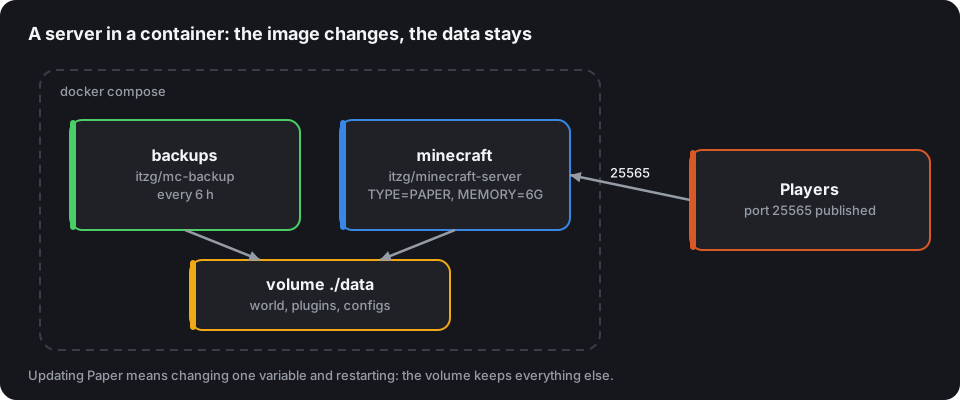
The reference image
The itzg/minecraft-server image is the most used: it downloads the right version of Paper, Purpur, Fabric or Forge and the right Java version at startup, according to environment variables.
The docker-compose.yml file
services:
  minecraft:
    image: itzg/minecraft-server
    restart: unless-stopped
    ports:
      - "25565:25565"
    environment:
      EULA: "TRUE"
      TYPE: "PAPER"
      VERSION: "1.21.1"
      MEMORY: "6G"
      USE_AIKAR_FLAGS: "true"
      MOTD: "My server"
      RCON_PASSWORD: "change-this-password"
    volumes:
      - ./data:/data
    tty: true
    stdin_open: true
docker compose up -d starts the server; docker compose logs -f minecraft shows the console.
Send commands
docker compose exec minecraft rcon-cli
Without arguments, rcon-cli opens an interactive console; docker compose exec minecraft rcon-cli say Restarting in 5 minutes sends a single command. The image enables RCON internally for this purpose: never publish its port (25575) to the outside.
Automatic backups
Add a second service that backs up the volume at regular intervals:
  backups:
    image: itzg/mc-backup
    restart: unless-stopped
    environment:
      BACKUP_INTERVAL: "6h"
      PRUNE_BACKUPS_DAYS: "7"
      RCON_HOST: minecraft
      RCON_PASSWORD: "change-this-password"
    volumes:
      - ./data:/data:ro
      - ./backups:/backups
    depends_on:
      - minecraft
Same RCON password as the server: that's how it pauses the server's writes during the copy (save-off / save-on) for a consistent backup. Regularly copy the backups folder off the machine: a backup on the same disk doesn't protect against a disk failure.
Updating
Pinning VERSION stops a restart from changing your version without you deciding it. To update, change it, then:
docker compose pull
docker compose up -d
Make a backup first, and check your plugins' compatibility with the new version: the full procedure is in Update your server without breaking anything.
A few tips
- Adjust
MEMORYwith the flags and RAM calculator; leave 1 to 2 GB for the system. - For several servers, one service per server and a Velocity proxy in front, in the same file.
- Files in
./databelong to the container's user: setUIDandGIDso you can edit them withoutsudo.