Build a server network with Velocity
14 September 2026 · updated on 07 October 2026 · 2 min read

A network is several Minecraft servers behind a single address. Players connect to a proxy, which sends them to the lobby, then to the game of their choice, without ever disconnecting. Velocity is now the recommended proxy: faster and safer than BungeeCord, maintained by the Paper team.
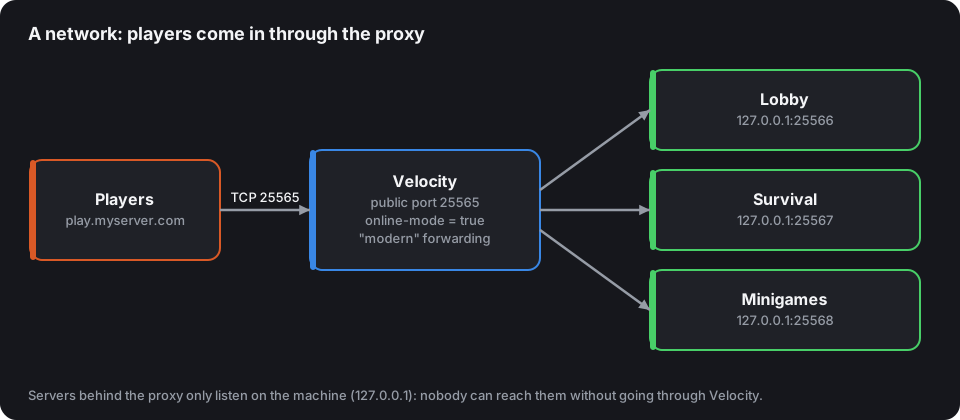
The architecture
- Velocity listens on public port 25565 and checks accounts (
online-mode = true). - Each Paper server listens on a local port (25566, 25567…) and only accepts the proxy.
- Player information (username, UUID, skin) travels from the proxy to the servers, signed with a shared secret.
Step-by-step setup
- Download Velocity and run it once: it creates
velocity.tomlandforwarding.secret. - In
velocity.toml:
bind = "0.0.0.0:25565"
online-mode = true
player-info-forwarding-mode = "modern"

[servers]
lobby = "127.0.0.1:25566"
survival = "127.0.0.1:25567"
try = ["lobby"]
- On each Paper server, in
config/paper-global.yml:
proxies:
  velocity:
    enabled: true
    online-mode: true
    secret: "the contents of forwarding.secret"
- Still on each server, in
server.properties:online-mode=false(the proxy does the checking), a differentserver-port, andserver-ip=127.0.0.1if everything runs on the same machine.
The security rule never to forget
A server in
online-mode=falsethat can be reached directly is a server where anyone can log in under your administrator's username.
Servers behind the proxy must never be reachable from the Internet: listen on 127.0.0.1, or a firewall that only allows the proxy's address. The server.properties generator flags this dangerous setup.
Where do the plugins go?
- On the proxy: what concerns the whole network, friend lists, private messages between servers, anti-bot, Geyser for Bedrock.
- On each server: gameplay, protections, economy, minigames.
- LuckPerms on all of them, connected to the same MySQL/MariaDB database: ranks follow the player from one server to another.
Performance
Velocity is light: 1 to 2 GB is enough for several hundred players. Use the flags recommended for the proxy (the startup flags tool gives them), and turn off compression on the servers behind it (network-compression-threshold=-1) if they're on the same machine: the proxy already compresses.