A web map of your world with BlueMap, Dynmap or squaremap
23 September 2026 · updated on 07 October 2026 · 2 min read
A web map shows your world in a browser, like an online map: players' towns, roads, faction borders. It helps players find their way, and helps you recruit, a link to a living map says "things are happening here" better than any description.
Three plugins, three styles
| Rendering | Weight | Default port | |
|---|---|---|---|
| BlueMap | 3D, navigable like in the game | a lot of disk, heavy rendering at first | 8100 |
| Dynmap | 2D and isometric views, very customisable | the heaviest of the three | 8123 |
| squaremap | 2D top-down view, plain | very light | 8080 |
For a survival server that wants to impress: BlueMap. For a small machine, or a purely practical map: squaremap. Dynmap is still useful for its many extensions (territory and town markers), but it's also the most demanding.
Install BlueMap
- Drop the
.jarintoplugins/(ormods/on Fabric and NeoForge) and start once. - In
plugins/BlueMap/core.conf, setaccept-downloadtotrue: BlueMap needs the game's textures, which it downloads from Mojang's servers. - Restart. Rendering starts by itself, in the background.
- Open
http://server-address:8100: the map fills in as it goes.
On an existing world, the first render takes hours. Run it when the server is quiet, and limit the render threads (render-thread-count in core.conf) to leave the game the cores it needs. Rendering also uses memory: the startup flags and RAM calculation gives you the right -Xmx value.
Disk space, to watch
A high-quality 3D map quickly weighs several gigabytes, sometimes as much as the world. Two levers:
- A world border: only what exists gets rendered. Pre-generating with Chunky, then rendering the map once, also avoids recalculating it with every exploration.
- Less detailed maps for the Nether and the End, or no map at all for them.
A nice address, over HTTPS
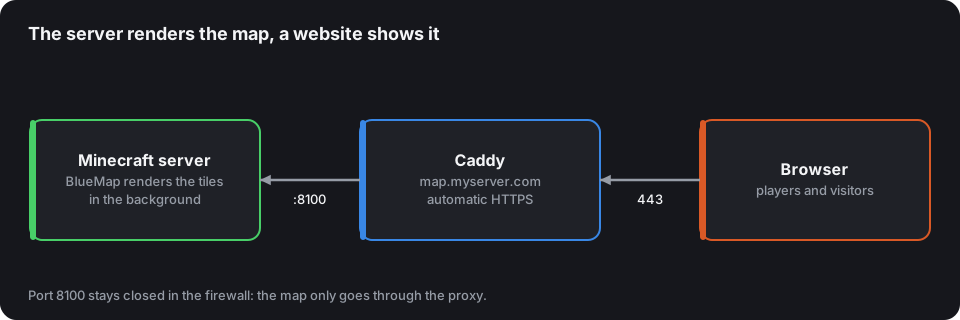
http://203.0.113.7:8100 doesn't get shared. Put the map behind a domain name with a reverse proxy. With Caddy, which gets the HTTPS certificate by itself:
map.myserver.com {
    reverse_proxy 127.0.0.1:8100
}
Create the map DNS record pointing to the machine's address (see domain name and SRV), open ports 80 and 443, and close 8100 in the firewall: the map only goes through Caddy.
With a Minecraft host, without access to the machine, ask support for an extra port; many provide one for this purpose.
What a map shouldn't show
- Players in real time, on a PvP or faction server: it hands everyone's position to their enemies. Turn off player display, or limit it.
- Hidden bases, on a survival server where people hide: let players mask their area, or delay rendering.
- Areas under construction for an event: a surprise discovered on the map isn't one any more.
Make it a selling point
Put the map link in your MOTD, your welcome message and your CubeVote listing's description. A screenshot of the map also makes an excellent gallery image: it's often what wins over a hesitant player.