Install a Minecraft server on a Linux VPS, properly
23 September 2026 · updated on 07 October 2026 · 3 min read

A VPS costs barely more than a Minecraft host and gives you the whole machine. In exchange, you're the administrator. This guide installs a Paper server the way you'd install a serious service: it starts with the machine, restarts after a crash, doesn't run as root and only exposes what it needs to.
The commands are written for Debian 12 and Ubuntu 24.04, the most common images at OVHcloud, Hetzner or Scaleway.
1. Secure SSH access
Before anything else, because a new VPS receives login attempts within the hour. From your computer:
ssh-keygen -t ed25519
ssh-copy-id debian@203.0.113.7
Log in with the key to check, then, on the VPS, in /etc/ssh/sshd_config:
PasswordAuthentication no
PermitRootLogin no
Also look in /etc/ssh/sshd_config.d/: on many images, a file like 50-cloud-init.conf re-enables passwords there and overrides yours.
sudo systemctl restart ssh. Keep the session open and test a new connection before closing: if something's wrong, you can still fix it.
2. The firewall
sudo apt update && sudo apt install -y ufw
sudo ufw allow OpenSSH
sudo ufw allow 25565/tcp
sudo ufw enable
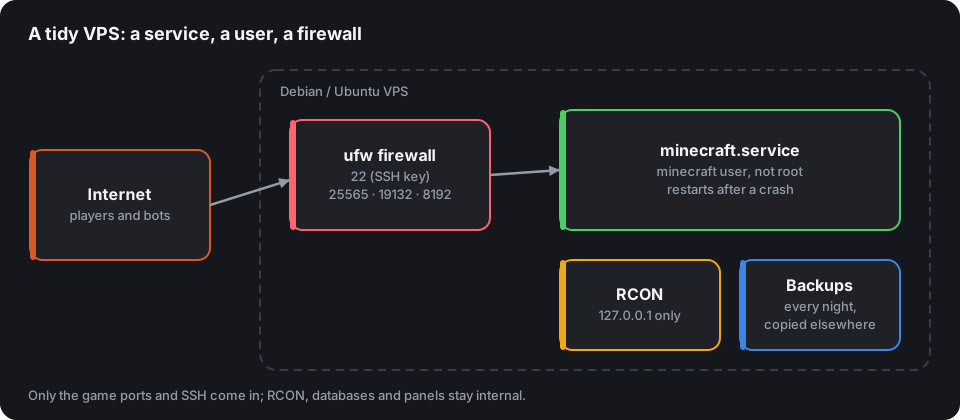
Later add 19132/udp for Geyser and 8192/tcp for Votifier. Nothing else: neither RCON, nor a database, nor an admin panel should be open to the Internet.
3. Java
Install the Java version matching your game version: Java 21 for 1.21, Java 25 for 26.x versions. The commands are in Which Java version for your server.
4. A user for the server
The server never runs as root: a compromised plugin would then have the whole machine.
sudo adduser --system --group --home /opt/minecraft minecraft
cd /opt/minecraft
sudo -u minecraft wget -O paper.jar "LINK_COPIED_FROM_PAPERMC.IO"
echo "eula=true" | sudo -u minecraft tee eula.txt
The download link is copied from the download page on papermc.io, for the version you want.
5. A systemd service
Create /etc/systemd/system/minecraft.service:
[Unit]
Description=Minecraft server
After=network-online.target
Wants=network-online.target

[Service]
User=minecraft
WorkingDirectory=/opt/minecraft
ExecStart=/usr/bin/java -Xms6G -Xmx6G -jar paper.jar nogui
Restart=on-failure
RestartSec=10
TimeoutStopSec=120
SuccessExitStatus=0 143

[Install]
WantedBy=multi-user.target
Then:
sudo systemctl daemon-reload
sudo systemctl enable --now minecraft
journalctl -u minecraft -f
On stop (sudo systemctl stop minecraft), systemd sends the stop signal, and the server saves the worlds before shutting down: the two minutes of TimeoutStopSec give it time. Set -Xmx with the flags and RAM calculator, leaving 1 to 2 GB for the system.
6. Send commands
The service has no interactive console. Enable RCON in server.properties, without opening its port in the firewall:
enable-rcon=true
rcon.port=25575
rcon.password=a-long-and-unique-password
Then use a command-line RCON client, such as mcrcon (published on GitHub by Tiiffi, a single file to compile with make):
mcrcon -H 127.0.0.1 -P 25575 -p "the-password" "say Restarting in 5 minutes"
7. Backups
A script run every night by cron, which pauses writing during the copy:
#!/bin/sh
R="mcrcon -H 127.0.0.1 -P 25575 -p the-password"
$R "save-off" "save-all flush"
tar -czf /var/backups/minecraft-$(date +%F).tar.gz -C /opt/minecraft world world_nether world_the_end plugins
$R "save-on"
find /var/backups -name 'minecraft-*.tar.gz' -mtime +7 -delete
Then send these archives off the VPS: a backup on the same disk doesn't protect against a disk failure or a compromised account. Your host's automatic backups (VPS snapshots) are a welcome addition, not a replacement: they restore the whole machine, not yesterday's world. And test a restore at least once.
8. System updates
sudo apt install -y unattended-upgrades
Security fixes then install by themselves. For Paper and plugins, follow Update your server without breaking anything.
What next?
Give your server an address with a domain name, check it with the server tester, then list it: its uptime, measured every two minutes, will warn you if the service goes down.
Prefer containers? The same server is set up in ten lines with Docker.